How to Change Product Key in Windows 11

Changing your Windows product key is a common task when you upgrade your system, switch editions, or fix activation issues. Many users face problems such as “Windows not activated” or invalid license errors after reinstalling the system or changing hardware.

The good news is: Windows 11 allows you to change your product key in just a few minutes, and you don’t need advanced technical skills.

In this guide, you will learn:

  • How to change product key in Windows 11
  • Multiple activation methods (Settings, CMD, SLUI)
  • Common errors and how to fix them
  • Best practices to avoid activation failure

🟡 What is a Windows Product Key?

A Windows product key is a 25-character license code used to activate your operating system.

Example format:

XXXXX-XXXXX-XXXXX-XXXXX-XXXXX

It tells Microsoft that:

  • Your copy of Windows is genuine
  • Your license type is valid (Retail / OEM / Volume)
  • You are allowed to use the system

Without activation, Windows may:

  • Show watermark “Activate Windows”
  • Restrict personalization settings
  • Show activation warnings

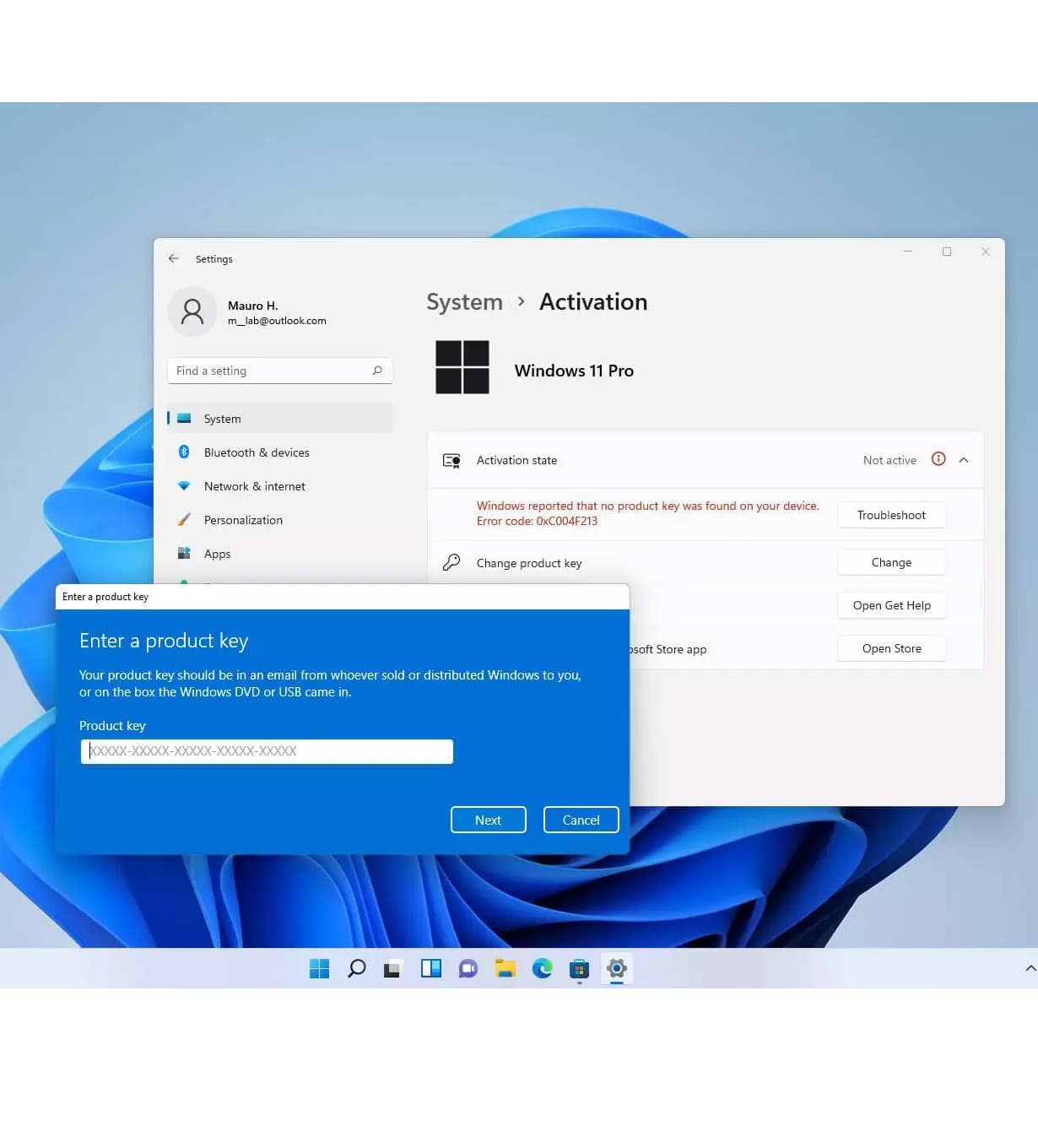
🟣 Method 1: Change Product Key via Windows Settings (Easiest)

This is the most common and beginner-friendly method.

Steps:

  1. Click Start Menu
  2. Go to Settings
  3. Click System
  4. Scroll and select Activation
  5. Click Change product key
  6. Enter your new 25-character key
  7. Click Next
  8. Wait for Windows to verify

If the key is valid, your system will activate immediately.


🔵 Method 2: Change Product Key Using CMD (Advanced)

If Settings method fails, you can use Command Prompt.

Steps:

  1. Press Windows + S
  2. Type cmd
  3. Right-click → Run as Administrator

Now enter:

slmgr /ipk XXXXX-XXXXX-XXXXX-XXXXX-XXXXX

Then activate:

slmgr /ato

What happens:

  • /ipk installs the product key
  • /ato triggers online activation

🟠 Method 3: Using SLUI Activation Wizard

Windows has a built-in activation tool.

Steps:

  1. Press Windows + R
  2. Type:
slui 4
  1. Press Enter
  2. Choose your region
  3. Follow activation instructions

This method is useful when:

  • Internet activation fails
  • You need phone activation

🔴 Common Errors When Changing Product Key

❌ Error: 0xc004f050

Meaning: Invalid product key

✔ Fix:

  • Check for typing mistakes
  • Ensure correct edition (Home vs Pro)

❌ Error: 0x803fa067

Meaning: Activation server blocked request

✔ Fix:

  • Wait and retry later
  • Change network connection

❌ Error: 0xc004c003

Meaning: Key blocked by Microsoft

✔ Fix:

  • Key may be reused or not genuine
  • Use valid Retail/OEM license

🟡 Important Tips Before Changing Key

To avoid activation issues:

✔ Always check Windows edition first
✔ Backup system before major changes
✔ Use correct region-compatible key
✔ Avoid mixing OEM and Retail keys
✔ Ensure stable internet connection


🟢 How to Check Your Windows Edition

Before changing product key:

  1. Go to Settings
  2. Click System
  3. Click About
  4. Check:
    • Windows 11 Home
    • Windows 11 Pro

⚠️ Wrong edition = activation failure


🔵 Why Windows Activation Fails After Update?

Many users report activation loss after:

  • BIOS update
  • Hardware change
  • System reinstall
  • Major Windows update

This happens because:

  • Hardware ID changes
  • Microsoft re-verifies license binding

🟣 Best Practice for Stable Activation

To avoid future issues:

✔ Use Retail key for flexibility
✔ Link Windows license to Microsoft account
✔ Avoid pirated or leaked keys
✔ Keep recovery email updated


🧠 Conclusion

Changing your Windows 11 product key is simple when you follow the correct method. Most users can activate their system within minutes using Settings, CMD, or SLUI.

If one method fails, another usually works.

The key takeaway:
👉 Always match your product key with the correct Windows edition
👉 Use official activation methods to avoid errors
👉 Keep your system properly licensed for long-term stability
How to Change Product Key in Windows 11

(14 customer reviews)
Original price was: $129.00.Current price is: $9.90.

Windows 11 Pro Retail Key – Lifetime activation, unlimited reinstallations, and instant auto delivery. Secure purchase with USDT, BTC, ETH, and 300+ cryptocurrencies.

×
  • You can complete your payment securely using credit card.
  • Payment will be processed through our official AliExpress checkout.
  • Product price: $9.9
  • Please purchase 10 units of the $1 item.
  • Leave a note with your product name or order number.

    Leave a Reply

    Your email address will not be published. Required fields are marked *